
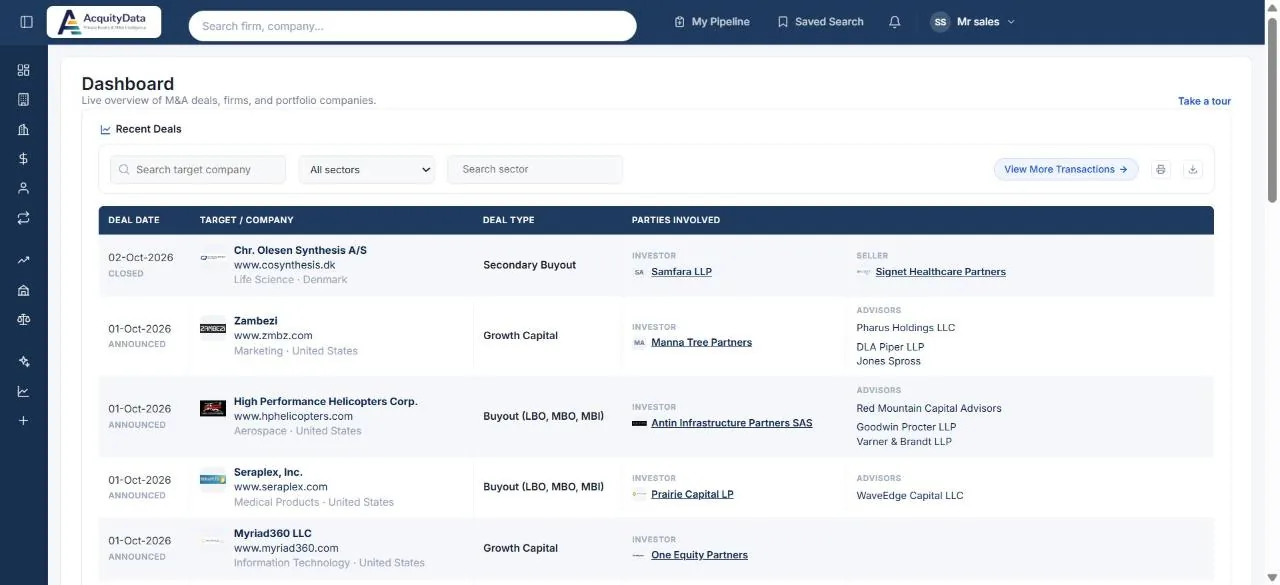
The left menu
The icons down the left edge open each section. The menu starts collapsed to icons; select the panel button at the top left to expand it and show the names. Your choice is remembered.
| Menu item | What it opens |
|---|---|
| Dashboard | Recent deals and a live overview of M&A activity. |
| Companies | Search and filter every company. Guide |
| Firms | Search PE firms and investors. Guide |
| Capital Connect | Companies ripe for exit, raising capital, or open to a sale. Guide |
| Professionals | People at firms, companies and advisors. Guide |
| Transactions | Every deal, with filters. Guide |
| Funds | Funds and the firms that manage them. Guide |
| Investment banks, Law firms | Advisors and the deals they worked on. Guide |
| AI Search | Ask a question in plain English. Guide |
| Top List | The most active firms and companies, ranked. Guide |
The top bar
- Search box: finds companies, firms, funds, advisors and people by name from anywhere. More
- My Pipeline: your target lists and outreach tracking. Guide
- Saved Search: saved searches, saved profiles and the profiles you follow. Guide
- Bell: your notifications.
- Your name: your account menu, with My Account and log out.
Recent Deals
The table lists the newest transactions with the target company, its sector and country, the deal type, the investor and seller, and any advisors. Use the boxes above the table to search a target company or narrow to a sector, and View More Transactions to open the full transaction search. The print and download icons export what you are looking at.
Take a tour: The Take a tour link on the dashboard, Companies and My Pipeline pages starts a short guided walk-through of that page.