
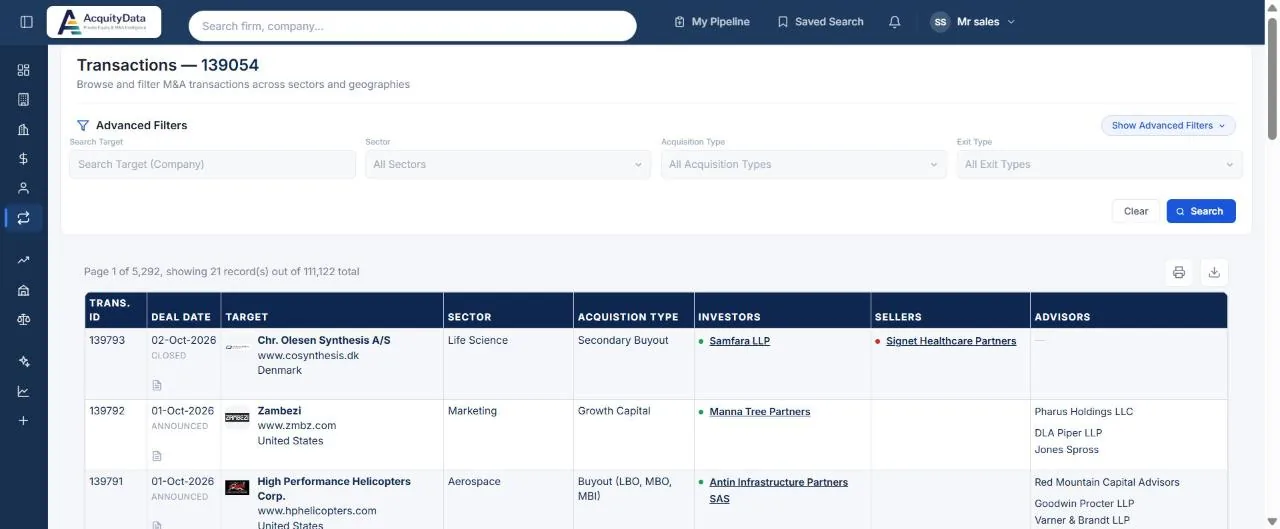
Run a transaction search
- Open TransactionsSelect Transactions in the left menu. The heading shows the total number of deals.
- Pick filtersSearch Target (a company name), Sector, Acquisition Type and Exit Type. Show Advanced Filters adds more.
- Select SearchThe table updates. Clear resets the filters.
- Open a dealClick the transaction ID to open the deal page.
What each column means
| Column | Meaning |
|---|---|
| Trans. ID | The deal’s reference number. |
| Deal Date | The date, marked Announced or Closed. |
| Target | The company that was bought or invested in, with its website, sector and country. |
| Acquisition Type | For example secondary buyout, growth capital, or buyout (LBO, MBO, MBI). |
| Investors | The buyer. A green dot marks an investor. |
| Sellers | The party that sold. A red dot marks a seller. |
| Advisors | Investment banks and law firms on the deal. |
Note: Deal size is only shown where it has been publicly disclosed. Many private deals list the parties and date without a value.