
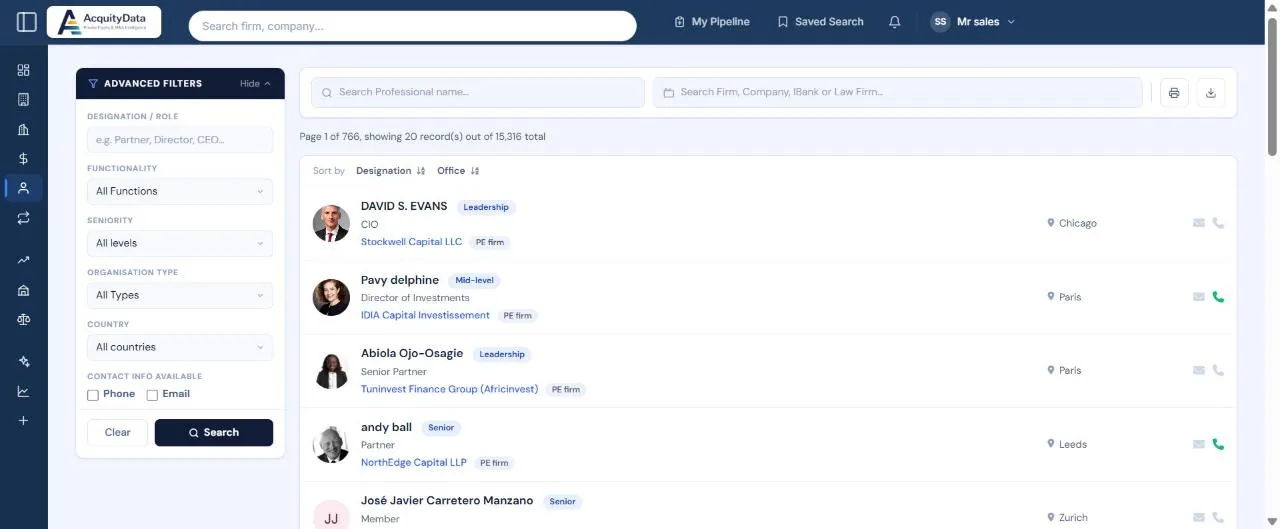
Run a professionals search
- Open ProfessionalsSelect Professionals in the left menu.
- Search by name or organisationType a person’s name, or start typing a firm, company, investment bank or law firm in the second box and pick it from the list to see only its people.
- Use the filter panelDropdowns and checkboxes update the list as soon as you change them. Text boxes update when you press Enter or pause typing.
- Open a profileClick a name to see their role, history and deals.
Filters
| Filter | What it narrows |
|---|---|
| Designation / Role | Words in the job title, for example Partner, Director or CFO. |
| Functionality | Investment, Administrative or Operations. |
| Seniority | Leadership (C-suite, founders, managing partners), Senior (partners and managing directors), Mid-level (VPs, principals, directors) or Junior (associates and analysts). |
| Organisation Type | Company, PE firm, Investment bank or Law firm. |
| Country | The country of the person’s office. |
| Contact info available | Tick Phone or Email to show only people we hold that detail for. |
Reading a row
Each row shows the person’s photo (or initials), name and seniority tag, job title, employer with its type, and office. The envelope and phone icons on the right turn green when we hold an email address or phone number for that person, and stay grey when we do not. On a paid plan, open the profile to see the details. On a free trial or preview account the details themselves are hidden (see Free account limits), but the icons still show whether we hold them.
You can sort the list by Designation or Office using the links above it.
Tip: Open a transaction first, then follow the links to the people involved. It is often faster than searching by name.