
How it works
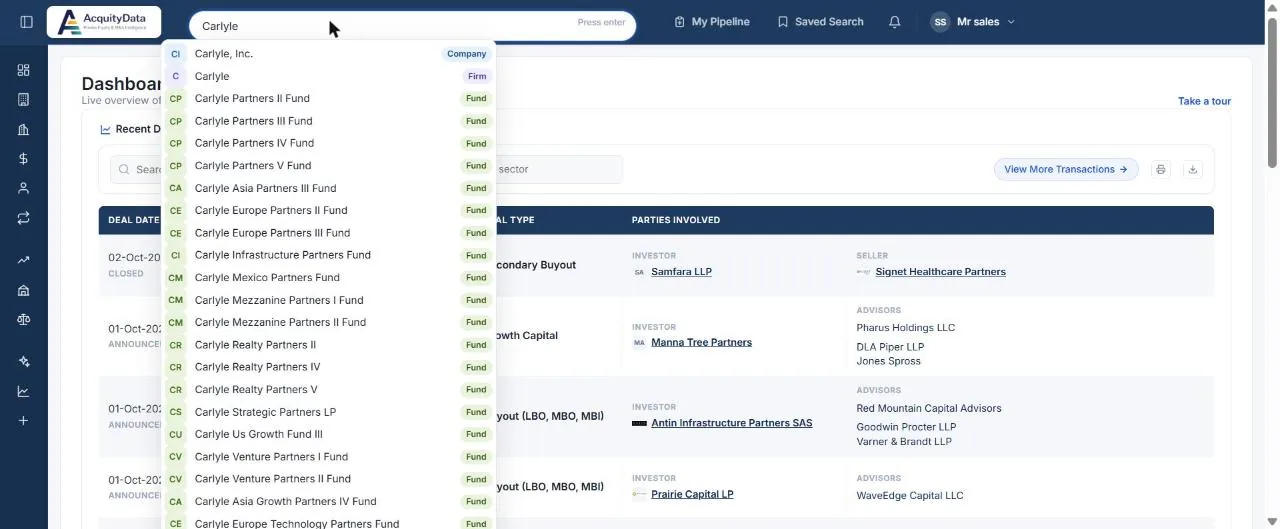
- Start typing a nameMatches appear straight away, for example a company, a PE firm or a fund.
- Check the tag on the rightEach result is tagged Company, Firm, Fund and so on, so you can tell a PE firm from a company with a similar name.
- Click a resultYou go directly to that profile.
Press Enter to run a full search for the text you typed instead of choosing a suggestion.
Tip: Searching for a PE firm often also shows its funds. If you want the firm itself, choose the result tagged Firm.
When to use a section search instead
The search box finds a known name. To explore by criteria, such as every software company in Germany, use the filters in Companies, Firms or Transactions, or ask in plain English with AI Search.