
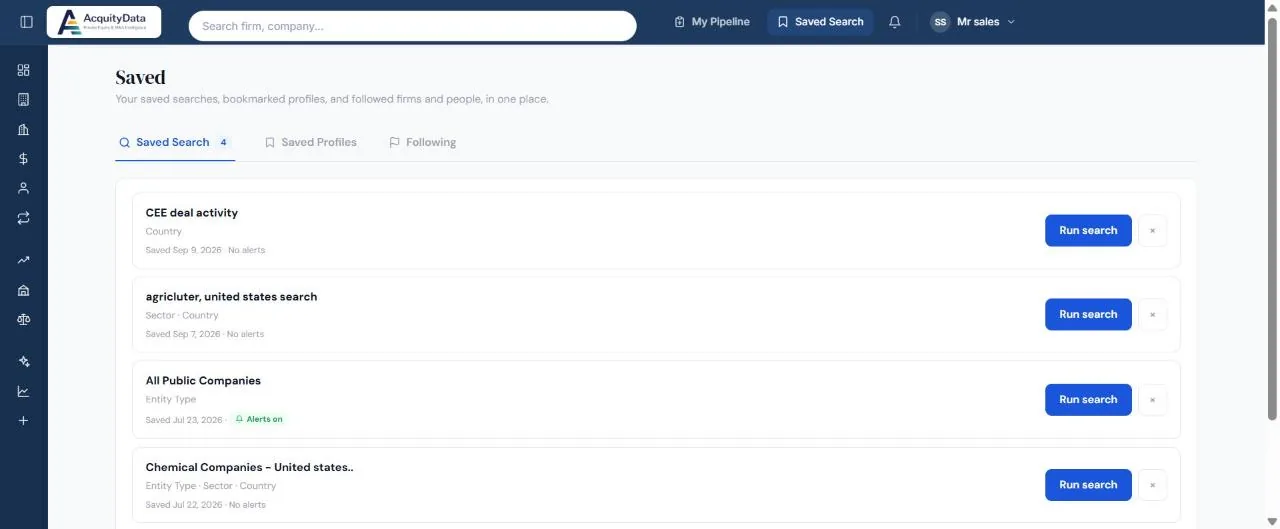
Save a search
- Set your filtersOn the Companies page, choose the filters you want and run the search.
- Select Save this searchThe button sits next to Clear and Search.
- Name itChoose a name you will recognise, for example “CEE deal activity”. Switch alerts on if you want to be notified about it.
- Find it laterSelect Saved Search in the top bar. Each saved search shows the filters it uses and when you saved it.
Run or delete
Select Run search to open the page with your filters applied. Use the × to delete a saved search.
Alerts
Searches saved with alerts show an Alerts on tag in your list, and the others show No alerts. Your notifications are under the bell in the top bar.
Pairs well with: Following profiles, which tracks individual firms and companies instead of a set of filters.