
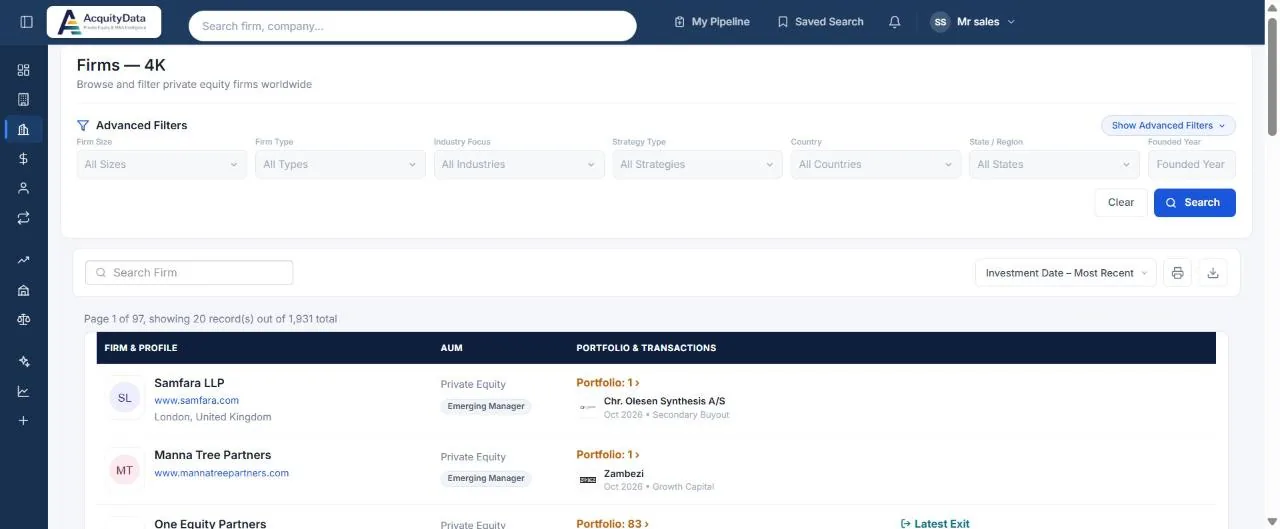
Run a firm search
- Open FirmsSelect Firms in the left menu.
- Apply filtersUse Firm Size, Firm Type, Industry Focus, Strategy Type, Country, State / Region and Founded Year.
- Select SearchResults update. Clear resets everything.
- Sort the listThe default sort puts the most recently active firms first. You can also sort by name, AUM or portfolio size.
- Open a firmClick a name to see its full profile.
Filters available
| Filter | What it narrows |
|---|---|
| Firm Size | Size band of the firm, for example lower middle market or mega. |
| Firm Type | The kind of investor. |
| Industry Focus | Sectors the firm invests in. |
| Strategy Type | Investment approach, for example buyout or growth. |
| Country, State / Region | Where the firm is headquartered. |
| Founded Year | When the firm was founded. |
Reading a row
- Firm & Profile: name, website, location, and a link to its team members.
- AUM: the firm type, its size band and assets under management where known.
- Portfolio & Transactions: the number of portfolio companies, with the latest acquisition and the latest exit.
Tip: Combine an industry with a country and sort by most recent investment to see who is actively buying right now. A worked example: Find PE firms in the software sector.